
The Best AI Visualization Tools for 2027, Picked by Use Case
There's no single best AI visualization tool, because an architect, a homeowner and an estate agent need different things. Here's the pick for each job, and what it costs.
Start with the job, not the tool
AI visualization tools all promise realistic images, and most deliver. Where they differ is what you start from (a sketch, a 3D massing model, or a photo of a real place), what they cover (interiors, exteriors, staging), how you refine a result, and how they charge. Pick the job first and the list gets short.
We make CreateLevel, one of the tools below, so read with that bias in mind. Prices come from each tool's own pricing page, checked on 18 November 2026 (22 November for Gendo).
Picks at a glance
| Use case | Our pick | Also consider |
|---|---|---|
| Architecture studio, team rendering | Gendo.ai | Mnml.ai |
| Renovating a real home, inside and out | CreateLevel | Spacely AI |
| Facades and elevations | Mnml.ai | Gendo.ai |
| Concepts that start as a drawing | NewArc.ai | CreateLevel |
| Real estate staging at volume | InteriorAI | ReRoom.ai |
| Lowest spend, no subscription | Dehome.ai | Spacely AI |
1. Architecture studios: Gendo.ai
Gendo turns sketches and massing models into renders on a shared project canvas, with Material Change, Style Transfer and video. Studio is $100 a month for unlimited generations and five seats. For a practice that renders every day as a team, it's the most complete package here. The free plan is one watermarked canvas.
2. Renovating a real home: CreateLevel
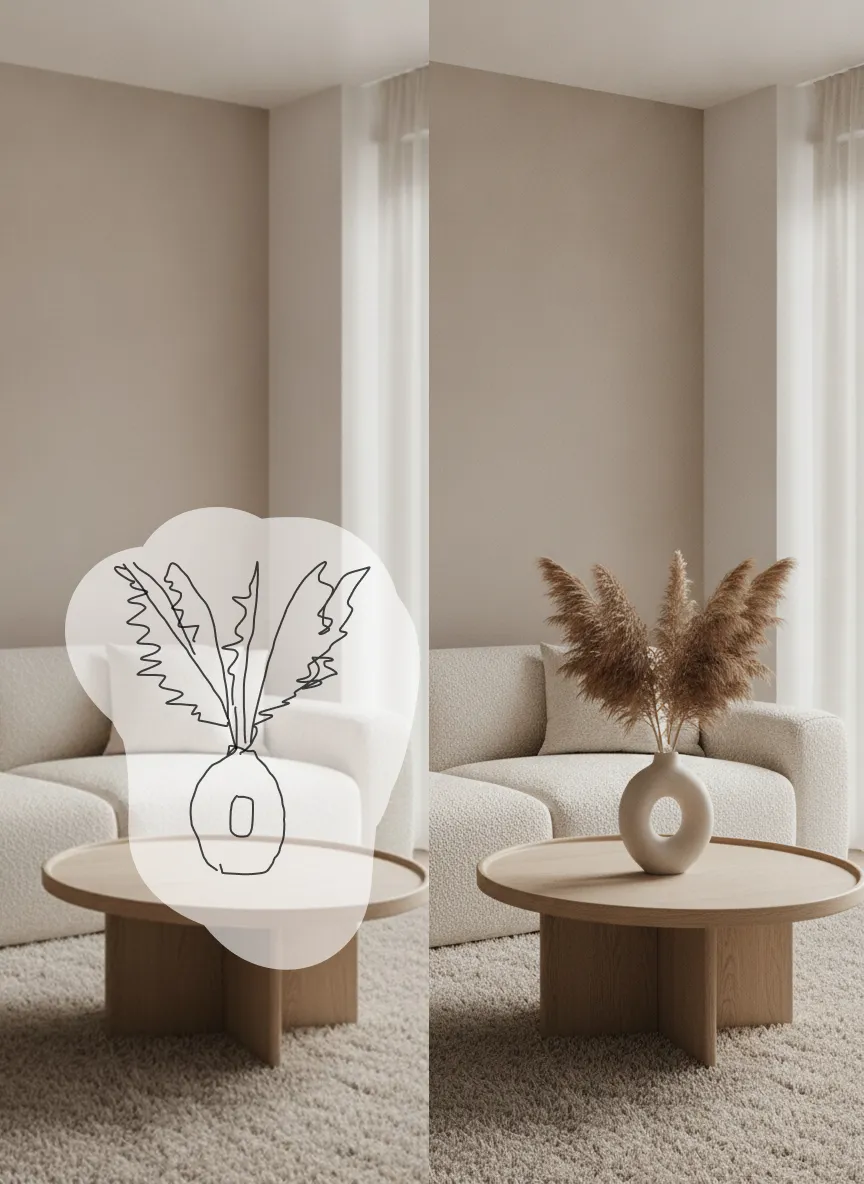
When the house already exists, it's quicker to start from a photo than to model it. CreateLevel restyles a room or a house front from one phone photo, so you can see a new kitchen, paint colour, cladding or garden on the actual place. You refine by describing the change in plain words, or by drawing it on the photo: a rough outline of a vase, a shelf or a new window, and the render follows your lines.
Results can go on a shared canvas where a partner or builder joins free from a link, sees renders appear live and leaves notes next to the one they like. Favourites upscale to 2K, or 4K on Pro. It's not built for massing models or video, and it isn't unlimited.
You can try it with 5 free renders, no card and no watermark. After that it's a $7 week pass (40 renders), $19 a month for 150, or $49 for 500 with a commercial licence; details on the pricing page.
3. Facades and elevations: Mnml.ai
Mnml has dedicated Exterior and Elevation tools, Sketch to Image, 8K upscaling and DXF export. $29 a month buys about 100 fast renders, and 100 free credits need no card. If your output ends up in drawings or planning packs, it's the strongest fit.
4. Concepts that start as a drawing: NewArc.ai
NewArc's whole product is sketch-to-render, which makes it a good match when there's no photo yet. Its last published plan was $39 a month for unlimited images; its pricing page was offline in November 2026, so check in the app. Our scribble-to-image guide covers what to draw for any of these tools.
5. Real estate staging at volume: InteriorAI
InteriorAI is built only for interiors and staging. Plans start at $49 a month ($29 billed yearly) for 1,000 designs on its base model; editing tools unlock on Premium at $99, where 5,000 designs work out around $0.02 each. There's no free tier. ReRoom ($39 unlimited, 3 free watermarked renders a day) is the alternative if you'd rather not commit to Premium. For single listings, see virtual staging.
6. Lowest spend: Dehome.ai
Dehome sells credit packs with no subscription and no expiry: $9.99 for up to 45 images, $29.99 for up to 300. It covers interiors, exteriors and sketch-to-render. Spacely's $10 monthly plan is the subscription equivalent.
Features and pricing side by side
| Tool | Interior | Exterior | Sketch input | Refine one area | Team sharing | Entry price | Free tier |
|---|---|---|---|---|---|---|---|
| Gendo.ai | Limited | Yes | Yes | Yes | Seats, $20 each extra | $100/mo unlimited | 1 canvas, watermarked |
| CreateLevel | Yes | Yes | Yes, also on a photo | Draw on photo or describe it | Free invitees, live canvas | $19/mo or $7 pass | 5 renders, no watermark |
| Mnml.ai | Yes | Yes, plus elevations | Yes | Not advertised | Not advertised | $29/mo | 100 credits |
| NewArc.ai | Yes | Not a focus | Yes, core feature | Not advertised | Not advertised | $39/mo (last published) | Capped credits |
| InteriorAI | Yes | Not a focus | Yes | Premium only ($99) | Not advertised | $49/mo | None |
| ReRoom.ai | Yes | Limited | Yes | Not clearly advertised | Not advertised | $39/mo unlimited | 3/day, watermarked |
| Spacely AI | Yes | Yes | Not advertised | $25 Studio plan | Not advertised | $10/mo | 40 credits, watermarked |
| Dehome.ai | Yes | Yes | Yes | Not advertised | Not advertised | $9.99 pack | None |
Frequently asked questions
- What is an AI visualization tool?
- Software that turns a sketch, 3D model, photo or text prompt into a realistic image of a space or building, so you can see a design before it's built or changed.
- What's the best AI visualization tool for architects?
- Gendo for studios rendering as a team, at $100 a month unlimited. Mnml for facades and elevations, from $29 a month.
- What's the best AI visualization tool for homeowners?
- One that starts from a photo of your own home. CreateLevel does interiors and exteriors from one photo, with 5 free renders; Spacely is the cheapest monthly plan at $10.
- Are there free AI visualization tools?
- Mnml (100 credits), CreateLevel (5 renders, no watermark), Spacely (40 watermarked credits) and ReRoom (3 watermarked renders a day) all have free tiers. Dehome and InteriorAI don't.
Curious how your own room would look?
Upload a photo and try it. The first five generations are free, no card needed, and the plans start at $7 if you want more.
Keep reading
Free AI Interior Design From a Photo of Your Room
Free AI interior design from one photo: upload a room and get a photorealistic redesign in seconds. 50+ styles, mask-level editing, no credit card.
The Best AI Rendering Software for Interiors and Exteriors in 2027
AI render tools split into two camps: ones that start from a sketch or model, and ones that start from a photo. Here's which does interiors, which does exteriors, and what each costs per render.
The Best Interior Design Apps for 2027: 9 Picks, Sorted by the Job
'Interior design app' covers three very different kinds of tool. Pick the wrong kind and even the best app in it will feel useless. Here's how to tell them apart, and the best pick in each.
Gendo.ai Alternatives: Free and Cheaper Options
Looking for a Gendo.ai alternative? Compare CreateLevel, Mnml.ai and NewArc.ai on price, free tier, masking, sketch input and exterior support.
AI Virtual Staging for Real Estate Listings
Virtual staging AI for real estate: stage an empty room in about 30 seconds for roughly $0.10 a render, free to try. Furniture removal, decluttering and twilight conversion.