
Shared Canvases: Design a Room Together, Live, With AI
Design feedback used to arrive as screenshots in a group chat. Now the photo, every render made from it and everyone's notes sit on one board, and the people you invite can watch ideas land as they happen.
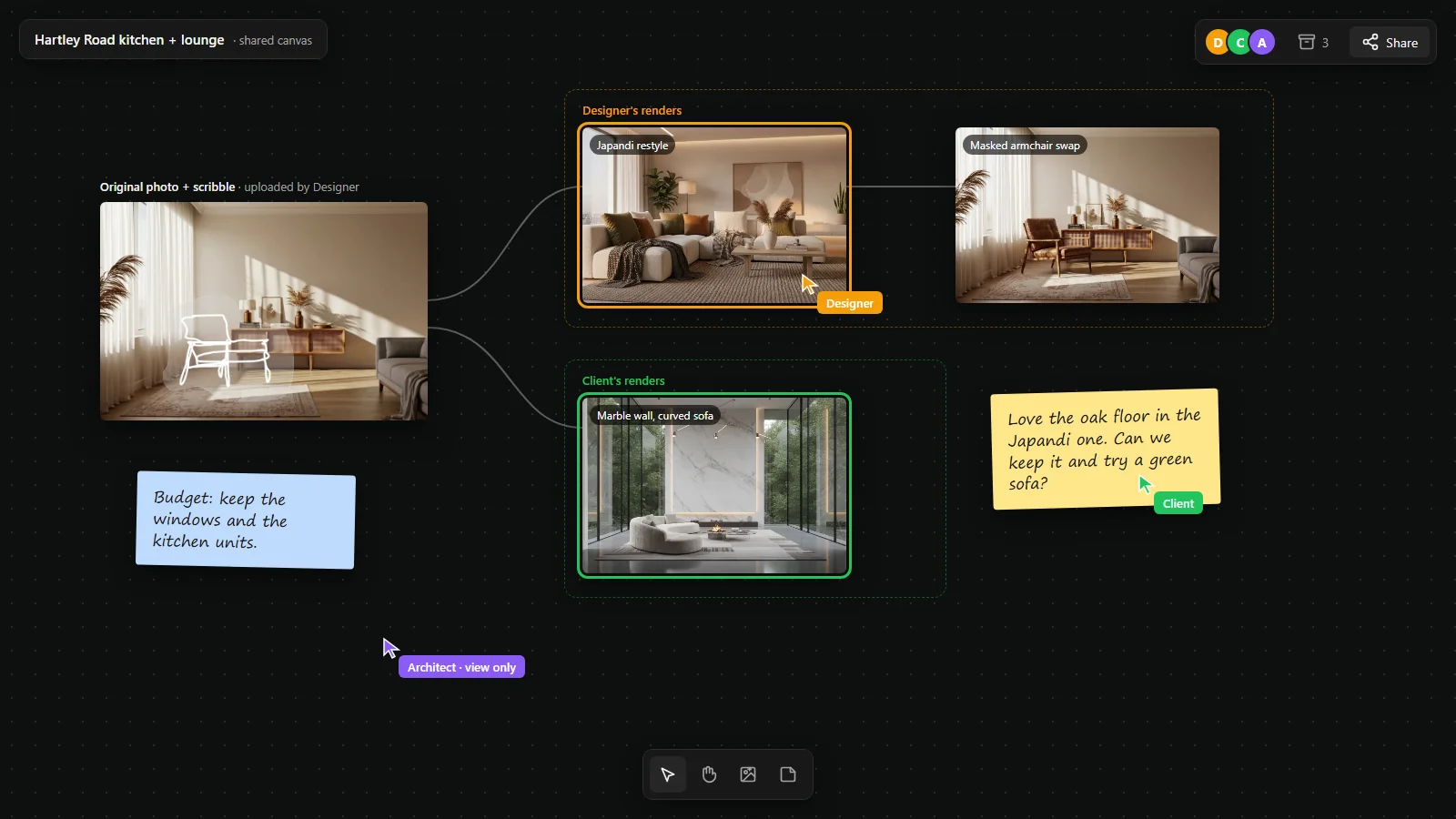
The group chat problem
Here's how a redesign goes once a second person gets involved. You make a few renders, screenshot the best three, and drop them in WhatsApp. Your client replies 'the second one, but with the floor from the first'. Their partner answers in a different thread. By Thursday nobody knows which image is 'the latest one', and the prompt behind the good version is lost.
The renders were fine. The trouble was that the work and the conversation about it lived in different places. A shared canvas puts them in one place, whether that's a designer and a client, a couple who can't agree on the sofa, or an agent getting a seller to sign off on staging.
What a shared canvas is
A board with no edges. Drop room photos on it, make renders from them, and leave notes next to the bits you want to talk about. Every render sits next to the image it came from, joined by a line, so when someone points at a version they like you can trace it back and reuse its prompt and settings.
Working together in real time
Everyone on the canvas has a named cursor in their own colour. When the designer drags a render into a 'shortlist' corner, the client sees it move; when the client leaves a note saying 'love this floor', everyone sees it. You stop describing images and start pointing at them, which is why a 20-minute call on a shared canvas settles more than a week of messages.
Renders are made on the board with the same tools as the AI interior design editor: describe an edit in plain words, restyle with a preset, scribble a new layout over the photo, or upscale a favourite to 2K (4K on Pro).
Edit links and view links
Click Share and copy one of two links. An edit link lets someone move things, write notes and make renders. A view link lets them watch, with 'View only' shown so there's no confusion. As the owner you can remove anyone, and 'Disable all links' kills every invite in one click once a project's done.
| Can they… | Owner | Editor | Viewer |
|---|---|---|---|
| See the canvas and cursors live | Yes | Yes | Yes |
| Move images, add photos and notes | Yes | Yes | No |
| Make renders (on the owner's plan) | Yes | Yes | No |
| Archive and restore items | Yes | Yes | No |
| Invite or remove people | Yes | No | No |
| Delete items for good | Yes | No | No |
Who pays, and what it doesn't do yet
Joining is free. Renders made on your canvas come off your plan as the owner, whoever presses the button, so a client can try 'the same, but in walnut' without signing up for anything. Creating a canvas needs any paid plan; the $7 Day Pass covers a one-off project with 40 generations over a week, and client work you bill for needs Pro for the commercial licence. See the plans.
Anything an editor removes goes to the canvas Archive and can be put back; only the owner can delete for good. There are no threaded comments yet (notes do that job) and no whole-canvas snapshots. Both are on our list.
Frequently asked questions
- Can I collaborate with a client on an interior design in real time?
- Yes. Create a shared canvas, send an edit or view link, and you'll both see each other's cursors, notes and new renders live.
- Does the person I invite need to pay?
- No. Anyone with an account can join from a link for free. Renders they make on your canvas use your plan's generations.
- Which plan do I need to create a shared canvas?
- Any paid plan, starting with the $7 Day Pass. For client work you invoice, Pro includes the commercial licence.
Curious how your own room would look?
Upload a photo and try it. The first five generations are free, no card needed, and the plans start at $7 if you want more.
Keep reading
Free AI Interior Design From a Photo of Your Room
Free AI interior design from one photo: upload a room and get a photorealistic redesign in seconds. 50+ styles, mask-level editing, no credit card.
A Shared AI Workspace: Generate, Compare and Decide on One Live Canvas
Most AI image tools are built for one person and one prompt box. A shared canvas puts the whole team, every image and every version on one live board, so the decision happens where the work is.
Gendo vs CreateLevel: Two Collaborative AI Design Canvases Compared
Both tools put AI renders on a shared canvas your team can work on. They're built for different people, though, and the price gap is big enough that picking the wrong one hurts.
See Your Kitchen, Bathroom or Home Remodel Before It Starts
Preview a kitchen, bathroom or whole-home remodel on a photo of your own space before you get quotes. New cabinets, worktops, tiles and floors, one change at a time.
AI Virtual Staging for Real Estate Listings
Virtual staging AI for real estate: stage an empty room in about 30 seconds for roughly $0.10 a render, free to try. Furniture removal, decluttering and twilight conversion.