
Gendo vs CreateLevel: Two Collaborative AI Design Canvases Compared
Both tools put AI renders on a shared canvas your team can work on. They're built for different people, though, and the price gap is big enough that picking the wrong one hurts.
The short answer
Pick Gendo if you're an architecture practice rendering massing models and sketches as a team, need video, a shared materials library or single sign-on, and have about $100 a month for it. Pick CreateLevel if your work starts from a photo of a real room or house, you want clients to join a board for free, and you'd rather pay $7 for a project than $100 a month.
We make CreateLevel, so read the rest with that in mind. Every Gendo figure comes from its own pricing page, checked on 22 November 2026. Gendo shows prices in US dollars there, while its page metadata lists Studio at £79, so check the price in your currency.
At a glance
| Gendo | CreateLevel | |
|---|---|---|
| Built for | Architecture studios | Interiors and exteriors, from a photo or sketch |
| Entry paid price | Studio: $100/mo, or $83/mo yearly | $7 Day Pass (40 generations, 7 days), or $19/mo |
| Seats | 5 on Studio, extra $20/mo; free viewer seats | No seat fees; invitees join free |
| Free plan | 1 canvas, 2 members, watermark, 1k export | 5 generations, no card, no watermark |
| Live cursors | Not described on its site | Yes, named and coloured |
| Generations | Unlimited on Studio (fair use) | 40 to 500 per plan |
| Region editing | Material Change and region edits | Masking, scribble on photo, reference images |
| Video | Yes, paid add-on | No |
| Commercial licence | Studio and above | Pro ($49/mo) |
Seats, canvases and who pays
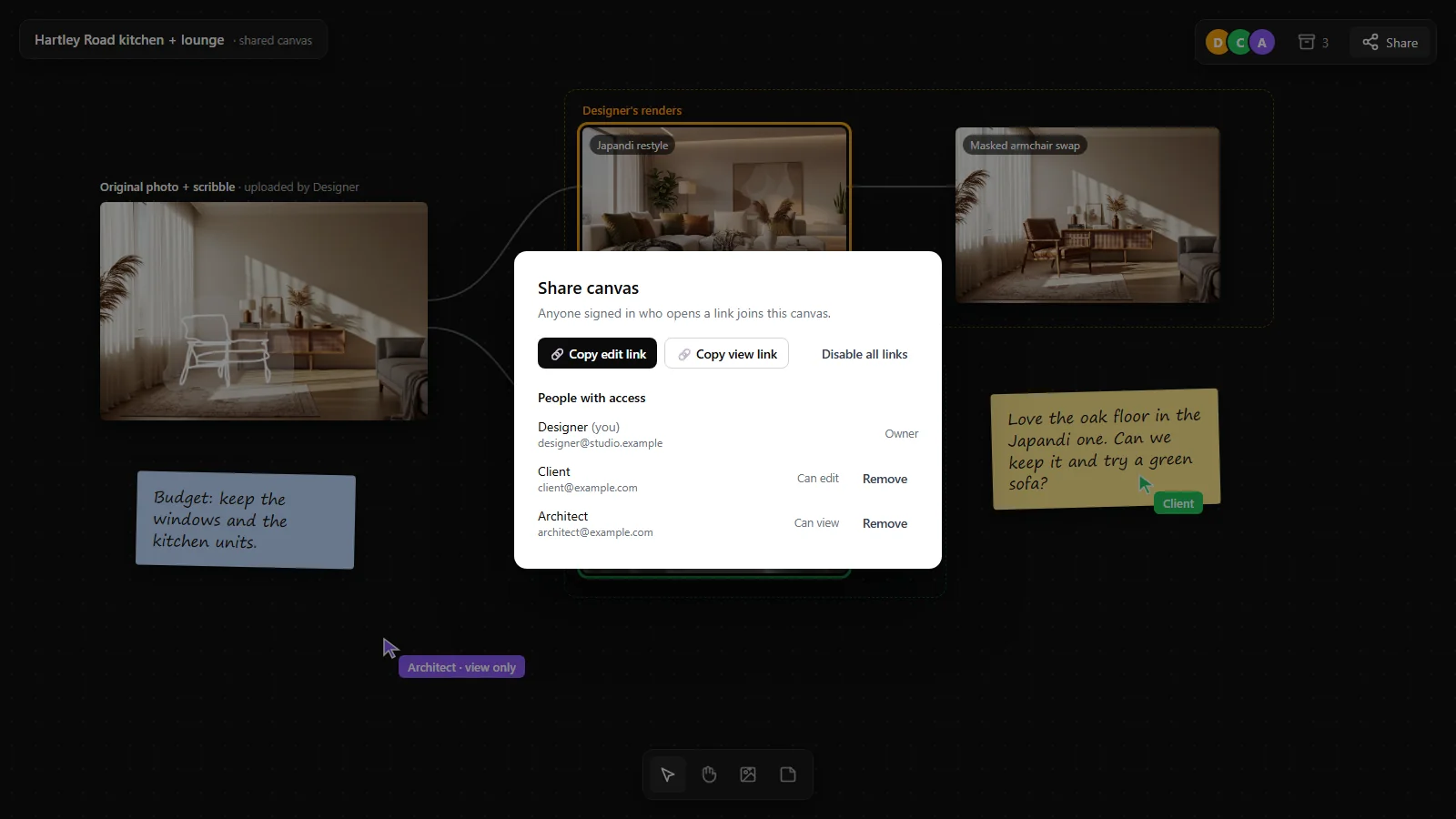
Gendo describes a collaborative project canvas with team roles and full history on Studio, which suits five architects iterating on one scheme. Its site doesn't describe what collaboration looks like in the moment, such as live cursors, so test that on the free plan. CreateLevel's shared canvas is built around live presence, with everyone's cursor and changes visible as they happen.
The bigger difference is seats. Gendo charges per seat, which is tidy for a fixed team. CreateLevel has none: anyone with an account joins from a link and renders come off the owner's plan. That suits work with clients, partners and contractors, though an enthusiastic client making 60 renders is using 60 of yours (you can switch them to a view link any time).
Pricing for a real project
Say you're redesigning one house over a month with a partner and a builder weighing in. On Gendo that's Studio at $100 for the month, with unlimited generations. On CreateLevel, a $7 Day Pass covers a week and 40 generations, or Starter is $19 a month for 150, and the other two join free. For a studio rendering all day, Gendo's unlimited plan may well be the better deal, since CreateLevel Pro caps at 500 a month for $49. Count a typical week's renders before deciding; our pricing page lists every plan.
When Gendo is the better pick
Gendo is architecture-first, with tools like Design to Image, Material Change, Style Transfer and video. If several of these apply, it's probably right for you:
- You're a practice of three or more rendering most days.
- You need video walkthroughs or animated renders.
- You want a shared studio materials library, or IT needs SSO and audit logs.
- Your inputs are mostly massing models and design-stage sketches, not photos.
When CreateLevel is the better pick
CreateLevel starts from the room you already have. It's the better fit if:
- You work from photos of real rooms and facades, especially interiors.
- Clients or contractors need to join without paying for a seat.
- You want precise single-object edits, like swapping one piece of furniture and keeping the room.
- Your budget is a project, not a studio subscription.
Frequently asked questions
- How much does Gendo AI cost?
- Studio is $100 a month, or $83 a month billed yearly, with five seats and unlimited generations. Extra seats are $20 a month. Prices from gendo.ai/pricing on 22 November 2026.
- Does Gendo have real-time collaboration?
- Gendo describes a shared project canvas with team roles and viewer seats. Its site doesn't describe live cursors, so test that on the free plan.
- Is CreateLevel a good Gendo alternative?
- For interiors and photo-based home redesigns, yes, from $7 a project or $19 a month with free access for invitees. For studios needing video, SSO or a materials library, Gendo is stronger.
Curious how your own room would look?
Upload a photo and try it. The first five generations are free, no card needed, and the plans start at $7 if you want more.
Keep reading
Gendo.ai Alternatives: Free and Cheaper Options
Looking for a Gendo.ai alternative? Compare CreateLevel, Mnml.ai and NewArc.ai on price, free tier, masking, sketch input and exterior support.
Shared Canvases: Design a Room Together, Live, With AI
Design feedback used to arrive as screenshots in a group chat. Now the photo, every render made from it and everyone's notes sit on one board, and the people you invite can watch ideas land as they happen.
A Shared AI Workspace: Generate, Compare and Decide on One Live Canvas
Most AI image tools are built for one person and one prompt box. A shared canvas puts the whole team, every image and every version on one live board, so the decision happens where the work is.
Best AI Interior Design Software in 2026: 8 Tools Compared
Eight photo-in, photo-out design tools on one page: what a render really costs, which let you change a single object, and which can handle the outside of a house.
The Best Interior Design Apps for 2027: 9 Picks, Sorted by the Job
'Interior design app' covers three very different kinds of tool. Pick the wrong kind and even the best app in it will feel useless. Here's how to tell them apart, and the best pick in each.